I'll be honest with you.
When I first heard someone was dictating code at 179 words per minute, I assumed they were lying.
Then I went through the actual data. The case studies. The funding reports. The independent benchmarks. And what I found surprised me.
Wispr Flow is not just "a faster way to type." The numbers show something much bigger happening here.
So in this article, I'm going to show you exactly what those numbers are. Growth stats. Accuracy data. User behavior metrics. Competitor comparisons. Funding breakdowns. All of it, sourced and explained clearly.
Let's dive right in.
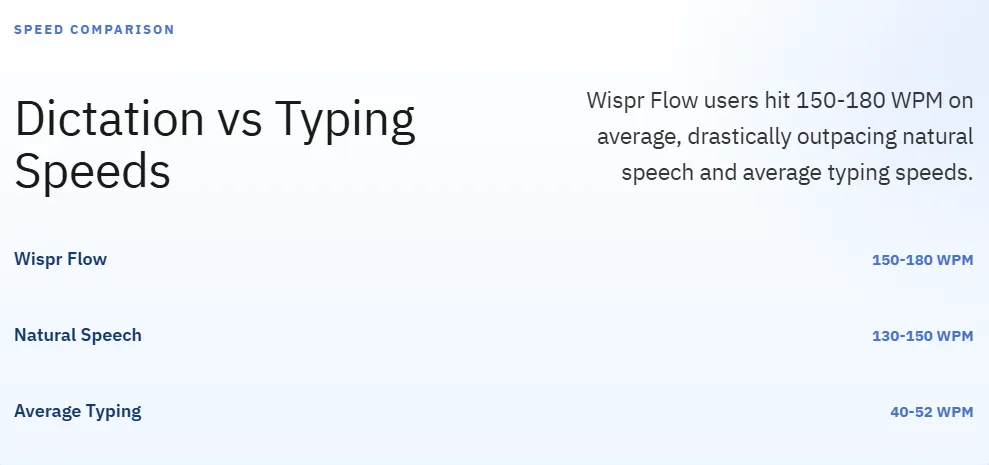
Wispr Flow users dictate at 150–180 WPM, versus the global average typing speed of 40–52 WPM (Wispr Flow)
The platform achieves an 85% zero-edit rate, compared to ~10% for competing dictation tools (AIX Ventures)
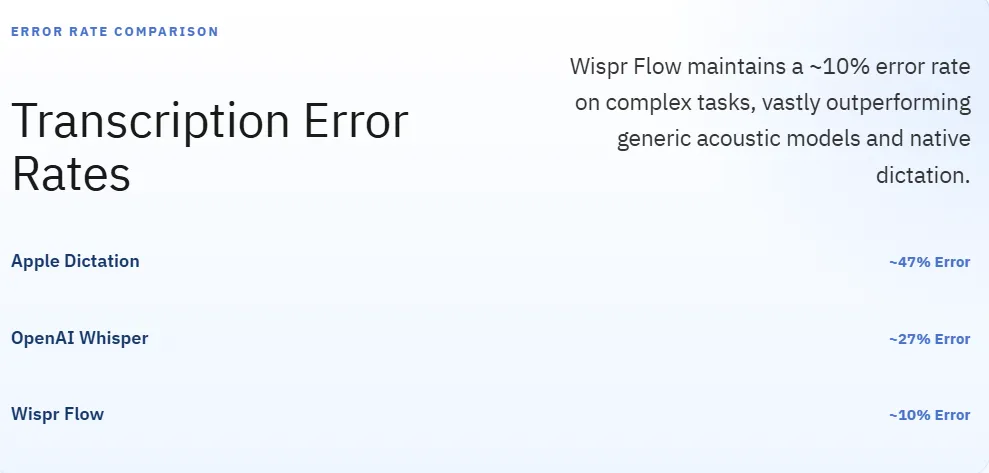
Word error rate sits at approximately 10%, versus 27% for OpenAI Whisper and 47% for Apple Dictation (Voibe)
End-to-end transcription latency is approximately 500 milliseconds (Voibe review)
Wispr Flow has seen 100x year-over-year user growth and 50%+ month-over-month growth (TechCrunch)
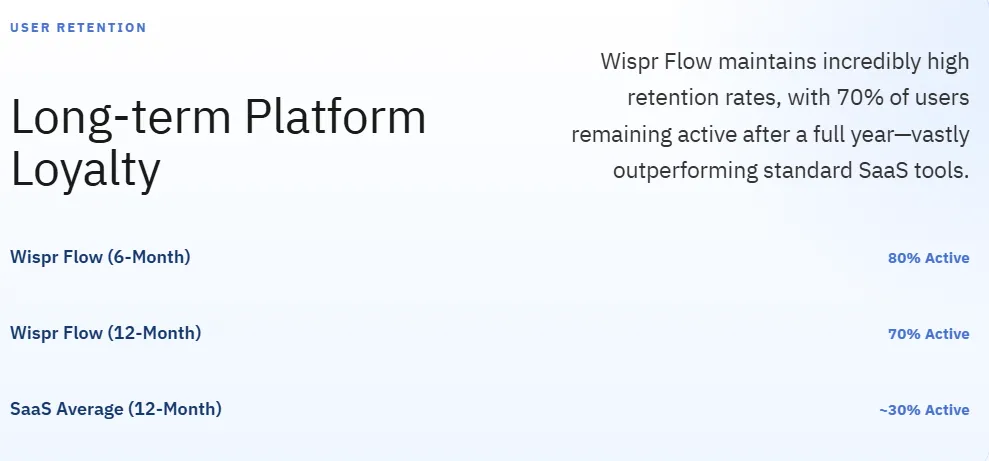
70% of users remain active after 12 months with 80% six-month retention (AIX Ventures)
The app is used inside 270 Fortune 500 companies with 125 new enterprise signups per week (Wispr Flow Business)
India is the #2 market by both users and paying subscribers with 80% of Indian users opting for annual plans (Economic Times)
Wispr Flow has raised $81M in total funding and reached a $700M valuation as of November 2025 (Sacra)
After 6 months of use, the average user writes 72% of their characters via voice across roughly 70 different apps (ProductGrowth teardown)
What is Wispr Flow?
Wispr Flow is an AI-powered voice-to-text system that runs across macOS, Windows, iOS, and Android, converting natural speech into polished, formatted text inside any application.
It works by combining automatic speech recognition (ASR) with large language models. You hold a hotkey, speak, and the text appears in whatever app you have open. No clipboard. No switching apps. No copy-paste loop.
Here's what separates it from basic transcription tools: it actively reads your screen context. If you're in VS Code, it formats code. If you're writing a Slack message, it stays casual. If you're drafting an email, it applies punctuation and structure automatically.
The company was founded in 2021 by Stanford alumni Tanay Kothari and Sahaj Garg (Wikipedia). But it didn't start as a dictation app.
It started as a brain-computer interface wearable. After three years of hardware R&D, the team decided current AI wasn't ready for neurological decoding, so they spun out the software layer they'd built and launched Wispr Flow as a standalone app in 2024.
That context matters a lot when you look at the funding numbers later.
Average dictation speed vs 40-52 WPM typing.
Dictated text goes straight to send without manual corrections.
End-to-end processing latency.
Six-month active user retention.
Speed statistics: WPM and productivity gains
What is Wispr Flow's dictation speed?
Wispr Flow users consistently achieve dictation speeds of 150–180 WPM. Some power users record sustained speeds up to 184 WPM. For comparison, the average person types at 40–52 WPM with highly proficient typists maxing out around 90 WPM.
That is a 3–4x speed advantage over typing.
Here's the breakdown:
Real-world speed case studies
These aren't marketing numbers. These are real user reports with actual dashboard data:
- A developer reported writing code, docs, and Slack messages at 179 WPM (Zack Proser).
- A marketing blogger documented 339,725 words dictated at 160 WPM across 94 apps over three months, ranking in the top 1% of all platform users (The Marketing Show).
- Another user logged 94,530 words in seven weeks at 119 WPM, top 3% on the platform (Automation Switch).
- A third user hit 243,554 words in 39 days at 129 WPM, top 2% (Modulovalue).
Not too shabby.
What the academic research says
A Stanford University study found that speech input is approximately 3x faster than typing for texting tasks with significantly lower error rates. This aligns exactly with what Wispr Flow's own telemetry shows.
Average human speech naturally flows at 130–150 WPM with rapid articulation reaching 180 WPM. The keyboard has always been the bottleneck. Wispr Flow removes it.
The "Vibe Coding" multiplier
Here's where it gets interesting for developers specifically.
As AI coding agents like Cursor and Windsurf handle more of the actual code generation, the developer's main job becomes writing dense, detailed prompts. A 300-word context prompt typed at 45 WPM takes nearly 7 minutes. The same prompt dictated at 180 WPM takes under 2 minutes.
Multiply that across a full day of AI-assisted development, and you're saving hours. Not minutes. Hours.
Users are reporting they can simultaneously manage multiple AI coding instances by dictating instructions to one agent, switching to another, and continuing. At typing speed, that's impossible. At 180 WPM, it becomes routine.
Accuracy and zero-edit rate data
What is Wispr Flow's accuracy rate?
Wispr Flow achieves an 85% zero-edit rate, meaning 85% of dictated text goes straight to send without any manual corrections (AIX Ventures). For comparison, competing dictation products average around a 10% zero-edit rate. Wispr's Word Error Rate (WER) sits at approximately 10% on complex, unformatted content, versus 27% for a standard OpenAI Whisper deployment and 47% for Apple's native dictation (Voibe).
Here's the full accuracy comparison:
Independent third-party testing has placed Wispr Flow's real-world accuracy between 90–97% depending on domain complexity and accent.
One benchmark cited across developer communities put Wispr at roughly 97.2% transcription accuracy, versus approximately 85–90% for Apple Dictation and 89–92% for Google Voice Typing (Voibe review).
Why Wispr's accuracy is so much higher
This is the part most reviews skip. So let me explain it clearly.
Traditional ASR converts audio waveforms into text. That's it. If the audio is unclear, it fails.
Wispr uses what's called a mixed-modal approach. It reads four sources at the same time:
1. Active screen context. If you're in a Python file, it knows calculateTotal() is a function name, not an error. 2. Global domain knowledge. It knows "Steven Bartlett" hosts "Diary of a CEO," so it catches that reference even if you say it quickly. 3. Semantic validation. It would catch "gabapentin 903 times a day" as medically impossible and correct it to "gabapentin 900, 3 times a day." 4. Local reinforcement learning. Every time you correct a mistake, it trains a personalized model on your specific vocabulary, style, and preferences. It literally learns not to make the same mistake twice.
This is why the zero-edit rate keeps improving over time. The longer you use it, the more accurate it gets. And the more accurate it gets, the harder it is to leave.
Processing latency
Wispr Flow achieves end-to-end processing latency of approximately 500 milliseconds (Voibe review). That's 0.5 seconds from when you stop speaking to when the text appears.
For context: the system's underlying LLM processes blocks of 50–100 words within a strict 250-millisecond window. It executes between 10 billion and 100 billion floating-point operations per request, compared to around 20,000 for traditional acoustic models (SE Radio 703: Sahaj Garg on Low Latency AI).
Getting that compute done in under 500ms is one of the harder engineering problems in this space.
Most users describe it as "near-instant." Independent reviewers noted the lag becomes slightly noticeable only when speaking continuously at maximum velocity.
Real user behavior statistics
This is where the data gets really interesting.
Wispr Flow publishes internal behavioral metrics, and several users have shared their personal dashboards publicly. Here's what those numbers actually show.
Voice adoption over time
- After 3 months of consistent use, the average Wispr user writes more than 50% of their characters via voice (ProductGrowth teardown).
- After 6 months, that number climbs to 72% of characters typed via Flow across roughly 70 different apps (ProductGrowth teardown).
- Users hit "send" within 0.5 seconds of seeing their dictated text appear (AIX Ventures fireside chat). That metric specifically measures whether users trust the output enough to send it without reading it carefully.
Let that last one sink in. 85% of text never needs editing, and users have gotten so comfortable with the accuracy that they read and send in half a second.
Habit formation metrics
- The hardest demographic to convert is the 22–35 age group. This cohort grew up on QWERTY keyboards and has decades of muscle memory to override.
- The easiest conversions come from very young users (native to Siri and Alexa) and significantly older users who see computers as pure utility tools.
- Despite the difficulty, Wispr's internal metrics show that 70% of retained users actively prefer Wispr over their keyboard after several months of continuous use (AIX Ventures).
The free tier churn trigger
Wispr's free plan has a 2,000-word monthly limit. Based on the power user case studies above, that cap is hit in roughly one day of active use. That forcing function pushes serious users onto paid plans fast.
The 19% conversion rate from free to paid reflects this design.
Growth and retention metrics
Wispr Flow growth stats at a glance:
- 100x year-over-year user growth (TechCrunch)
- 50%+ month-over-month user growth (at peak) (TechCrunch)
- 40% month-over-month growth in both users and ARR since June 2025 (ProductGrowth teardown)
- 70% of users remain active after 12 months (AIX Ventures)
- 80% six-month active user retention (AIX Ventures)
- Over 100 million words spoken on the platform every week (ProductGrowth teardown)
- ~$10M revenue in 2025 with a team of fewer than 50 people (GetLatka)
That 80% six-month retention is genuinely unusual for a productivity SaaS. Most tools see retention drop significantly in months 2 and 3. Wispr's numbers suggest the opposite: the more you use it, the harder it becomes to stop.
Here's why: the local reinforcement learning model trains on your specific vocabulary and correction patterns. After months of use, you have a personal AI that knows exactly how you speak. Switching to a competitor means starting over with a generic model that doesn't know your jargon, your name spellings, or your formatting preferences.
That is a real switching cost.
Enterprise adoption data
Wispr Flow enterprise stats:
- Used inside 270 Fortune 500 companies (Wispr Flow Business)
- 125 new enterprise companies signing up per week (Wispr Flow Business)
- SOC 2 Type II certified (Wispr Flow Privacy Policy)
- ISO 27001 certified (Wispr Flow Privacy Policy)
- HIPAA compliant on all paid plans (Wispr Flow Privacy Policy)
- 90% of growth is word-of-mouth (ProductGrowth teardown)
The word-of-mouth number is important. When high-profile early adopters like LinkedIn co-founder Reid Hoffman, Marc Andreessen, Steve Wozniak, and Rahul Vohra start publicly crediting a tool for their productivity, that spreads through their networks fast.
For legal teams, the HIPAA compliance and SOC 2 certification matter a lot. On enterprise plans, Privacy Mode is on by default, meaning zero data retention. Paid enterprise deployments don't use your data for model training.
(On free plans, Privacy Mode defaults to off. If you're handling sensitive data, you need to know that.)
Sector-specific impact
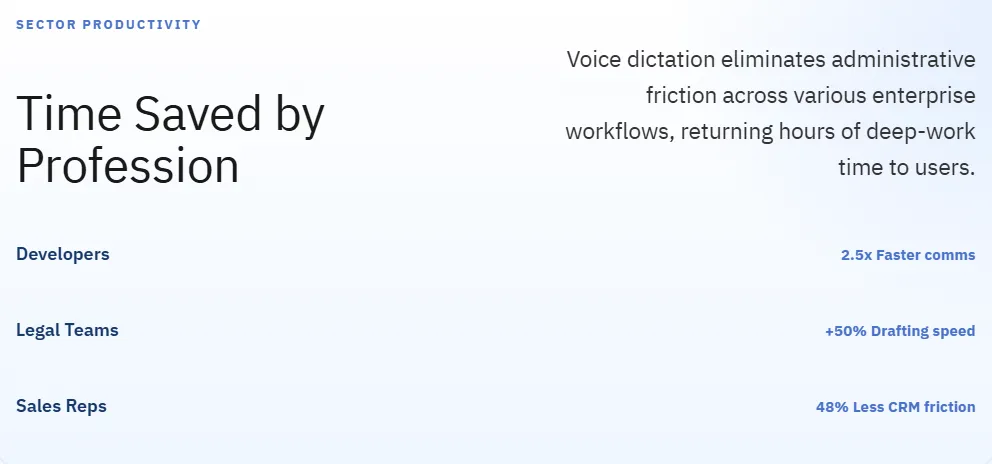
Legal: Attorneys spend more than 40% of their workweek on non-billable administrative typing. Integrating high-accuracy dictation into legal workflows can increase raw drafting productivity by approximately 50% (Wispr Flow legal dictation guide).
Sales: Industry data shows 48% of salespeople never follow up with a prospect. The administrative friction of CRM updates and follow-up email drafting is a primary reason. Voice-to-text removes that friction (Wispr Flow sales guide).
Development: Teams at Clay CRM reported 20% faster Go-To-Market execution after deploying Wispr Flow across their team (Wispr Flow use cases). Individual users report clearing communications backlogs 2.5x faster, recovering roughly 1.5 hours of deep-work time per week.
Global market statistics
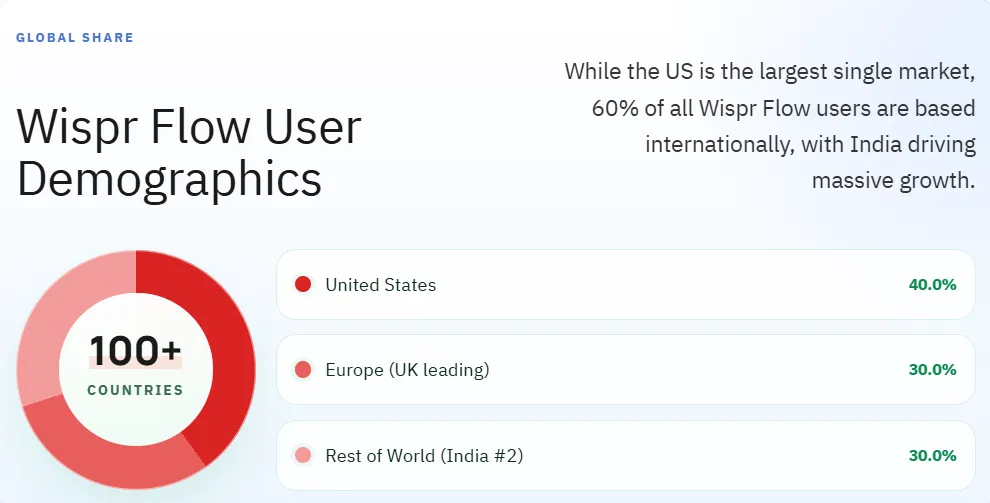
Wispr Flow's user base breaks down roughly as:
- 40% United States
- 30% Europe
- 30% Rest of world
But the growth story right now is happening outside the US.
India is Wispr Flow's second-largest market by both total users and paying subscribers. About 80% of Indian subscribers choose annual plans, compared to around 50% in the US (Economic Times).
The UK became Wispr's third-largest market with MAUs growing 7x in six months. UK users dictated 300+ million words in a single month (Wispr Flow UK announcement).
Wispr Flow supports 100+ languages with automatic mid-sentence language detection. Approximately 60% of all dictations happen in languages other than English (Wispr Flow). The recent deployment of a "Hinglish" (Hindi-English code-switching) recognition model signals a specific strategic push into the Indian market.
Funding and valuation data
Wispr Flow funding history:
The $700M valuation on $81M raised represents roughly a 10x multiple on invested capital. That's exceptional for a software company at this stage.
For context: ElevenLabs (AI voice synthesis) reached $3B on $250M raised. Wispr's voice-input focus is proving comparably capital-efficient.
Here's the thing about the funding amount: $81M is a LOT for what is, on the surface, a dictation app. That's because Wispr isn't really a dictation app.
The current software is Phase One of a three-phase "Master Plan." The company spent three years building a brain-computer interface wearable before pivoting. They have $94M+ in total venture backing, six funding rounds, and patents filed for silent speech decoding and a capacitive smart ring.
The dictation app is the data flywheel. The hardware wearable is the destination.
Competitor comparison
How does Wispr Flow compare to alternatives?
Here's the full breakdown:
Wispr Flow vs SuperWhisper
SuperWhisper is the main competitor for privacy-conscious users. It runs 100% locally on Apple Silicon using on-device Whisper models. Zero cloud dependency. Zero network transmission. Absolute data privacy.
The tradeoff: it doesn't have active-window context awareness, so it can't auto-format based on what app you're in. And it only works on Mac and iOS.
For anyone under an NDA, handling medical records, or managing proprietary code: SuperWhisper is the safer choice.
For everyone else who wants cross-platform support and AI-powered formatting: Wispr Flow wins on raw capability.
Wispr Flow vs Dragon Professional
Dragon has 99%+ accuracy on medical and legal terminology specifically. Nothing else comes close for clinical dictation. But it has no mobile app, no macOS support, and an interface that hasn't changed much in years.
Dragon's $699 lifetime license looks cheaper than Wispr Flow's $432 three-year cost ($144/year × 3) at first glance. But Dragon users are locked into whatever model version they purchased. Wispr users get backend upgrades as LLMs improve without paying more.
Okay, here's the honest take: neither competitor kills Wispr Flow across the board. The right tool depends entirely on your OS, your privacy requirements, and your domain.
Hardware and performance benchmarks
This is the section Wispr Flow would probably prefer you skip.
The Windows version (built on Electron) has real performance issues:
- ~800MB of RAM consumption while idling in the background (Voibe review)
- ~8% CPU utilization continuously, even when not actively dictating (Voibe review)
- Reports of the app causing thermal throttling on standard corporate laptops (Medium / Ryan Shrott)
- Occasional freezes in VS Code and other resource-intensive environments (Medium / Ryan Shrott)
Users in developer communities have called this the "Jet Engine Effect." The fans spin up just because Wispr is open.
The macOS version fares better, likely because it can take advantage of Apple Silicon's neural engine. But if you're on a Windows machine with limited RAM or an older laptop, this is a real consideration.
One additional technical limitation: Wispr Flow has a 6-minute maximum recording limit per session (Voibe review). The cloud-streaming architecture can't handle unbounded audio streams without running into memory and latency issues.
Privacy, compliance, and security stats
Security certifications:
- SOC 2 Type II
- ISO 27001
- HIPAA compliant
Data handling by plan:
- Free tier: Privacy Mode defaults to OFF. Audio, transcripts, and screen context may be retained and used for model training.
- Paid plans: Privacy Mode defaults to ON. Zero data retention. Third-party LLM data (via OpenAI/Meta) may be held for up to 30 days.
- Enterprise plans: Enforced Privacy Mode, zero retention, full admin controls.
The 2025 privacy controversy
In 2025, a Reddit user alleged that the Mac app was capturing screenshots and transmitting telemetry even when "zero data retention" was claimed. The user was initially banned from Wispr's community after posting.
The CEO publicly apologized, acknowledged the ban was wrong, and stated that policies and transparency had been updated.
The core architecture issue remains: Wispr Flow requires cloud processing to achieve its context-aware formatting. That means your audio leaves your device. If you need true air-gapped operation, Wispr Flow structurally cannot deliver that. SuperWhisper or Voibe can.
Wispr's Trustpilot rating sits at 2.7/5, largely due to data practices concerns (Voibe review).
Enterprise users should verify which specific telemetry is captured with Privacy Mode on before rolling this out at scale.
Key Wispr Flow statistics: Quick reference
Here's everything in one place:
Speed:
- Average user dictation speed: 150–180 WPM
- Peak documented speed: 184 WPM
- Average typing speed (global): 40–52 WPM
- Speed multiplier: 3–4x
Accuracy:
- Zero-edit rate: 85%
- Word error rate: ~10% (complex content)
- End-to-end latency: ~500ms
- Domain-specific accuracy (general writing): 97%
User behavior:
- Text written via voice after 3 months: 50%+
- Text written via voice after 6 months: 72%
- Number of apps used across: ~70
- 12-month retention: 70%
- 6-month retention: 80%
Growth:
- Year-over-year user growth: 100x
- Month-over-month growth (peak): 50%+
- Month-over-month growth (2025 sustained): 40%
- Words spoken weekly: 100M+
- Free-to-paid conversion rate: 19%
Enterprise:
- Fortune 500 companies using it: 270
- New enterprise signups per week: 125
Global:
- Second-largest market: India
- Third-largest market: UK
- UK MAU growth (6 months): 7x
- Languages supported: 100+
Financials:
- Total funding raised: $81M
- Valuation (Nov 2025): $700M
- 2025 revenue: ~$10M
- Team size: ~50 people
Final take
Wispr Flow's statistics make it one of the most impressive productivity tools to emerge from the AI wave of the last three years.
85% zero-edit rate. 100x year-over-year growth. 70% one-year retention. 270 Fortune 500 companies. $700M valuation.
But it's not perfect.
800MB RAM on Windows. No offline mode. A privacy controversy they handled poorly at first. A 6-minute recording cap.
For developers on Apple Silicon, content creators, sales teams, and remote executives: the speed and accuracy gains are genuinely transformative. For privacy-sensitive users or anyone on Windows with limited hardware: evaluate alternatives first.
The keyboard is 150 years old. Wispr Flow is betting their entire company that it's on the way out.
The numbers suggest they might be right.
Now go try it for yourself.
Domande frequenti
Risposte rapide alle domande più comuni di questo articolo.
01Quanto è veloce Wispr Flow?
Gli utenti dettano costantemente a 150–180 WPM. La velocità sostenuta più veloce documentata è di 184 WPM. La velocità media globale di digitazione è 40–52 WPM, rendendo Wispr Flow circa 3–4x più veloce per la maggior parte degli utenti.
02Quanto è accurato Wispr Flow?
Wispr Flow raggiunge un 85% di zero-edit rate, il che significa che l'85% del testo dettato non ha bisogno di correzione manuale prima di inviare. Il suo tasso di errore di parola è circa il 10% su contenuti complessi e non formattati. I benchmark indipendenti hanno misurato l'accuratezza intorno al 97,2%.
03Wispr Flow funziona offline?
No. Wispr Flow richiede una connessione internet attiva per tutta l'elaborazione. L'audio viene trasmesso ai server cloud (AWS/Baseten) per la formattazione alimentata da LLM. Per la dittazione offline, SuperWhisper o Voibe sono le principali alternative.
04Wispr Flow HIPAA è conforme?
Si', sui piani a pagamento. Wispr Flow possiede certificazioni SOC 2 Type II, ISO 27001 e HIPAA. I piani aziendali applicano la Modalità Privacy con zero dati di conservazione.
05Quanto costa Wispr Flow?
Wispr Flow costa $14.99/mese o $144/anno sul piano Pro. L'impresa è valutata a $24/seat/mese. Competitori: SuperWhisper a $849 vita o $8.49 / mese; Dragon Professional a $699 una volta.
06Wispr Flow prende screenshot?
Sì, nella sua modalità contestuale predefinito. L'applicazione cattura periodicamente gli screenshot attivi-finestra per migliorare la precisione di formattazione. È possibile disabilitare le funzionalità di contesto nelle impostazioni della privacy e i piani di pagamento predefiniti Modalità privacy a ON, impedendo la conservazione dei dati.
07Quante persone usano Wispr Flow?
Wispr Flow non ha divulgato i numeri utente totali pubblicamente, ma segnala la crescita di 100x anno su anno, 100M+ parole parlate settimanalmente, 270 Fortune 500 aziende come clienti, e 125 nuove firme aziendali a settimana.
08Come si confronta Wispr Flow con Apple Dictation?
Wispr Flow raggiunge circa un tasso di errore del 10% rispetto al 47% per la dittazione nativa di Apple. Wispr aggiunge anche la formattazione contestuale-aware, la compatibilità cross-app senza la dipendenza da clipboard e un modello di apprendimento personale. Apple Dictation è gratuito. Wispr Flow inizia a $14.99/mese.